01.
Animate the product image
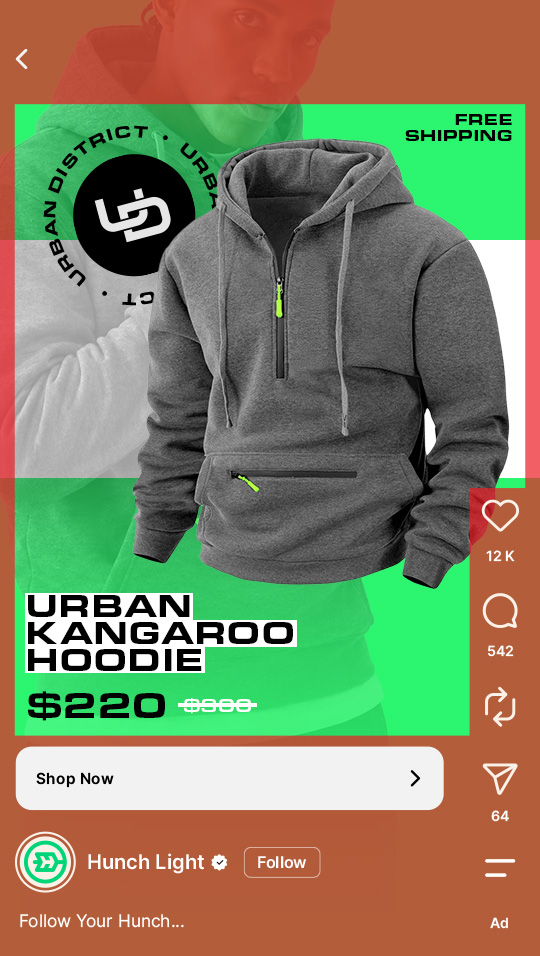
The image moves into frame, price and discount animate in.
Effort low. One product at a time stops working beyond a few hundred products.


[Catalog product video Guide]
Catalog product video gives every product in your catalog a video and lets Meta show it where video performs. For media buyers running Advantage+ catalog ads: how it works, how to set it up, how to measure it.
20% more conversions per dollar for ad sets with catalog product video.
Source: Meta, 1M+ ad sets
[Chapter 01]
One setting decides whether a catalog ad can appear as video. Knowing what it does, and what it does not do, prevents the usual false start: a video campaign that is not a catalog ad at all.
Advantage+ catalog ads take a product from the catalog, add its name and price, and deliver it to people who viewed that product or similar ones. Catalog product video lets each product carry a video as well as an image. Meta then uses automation and product ranking to deliver the most relevant product and the most performant creative asset to each person.
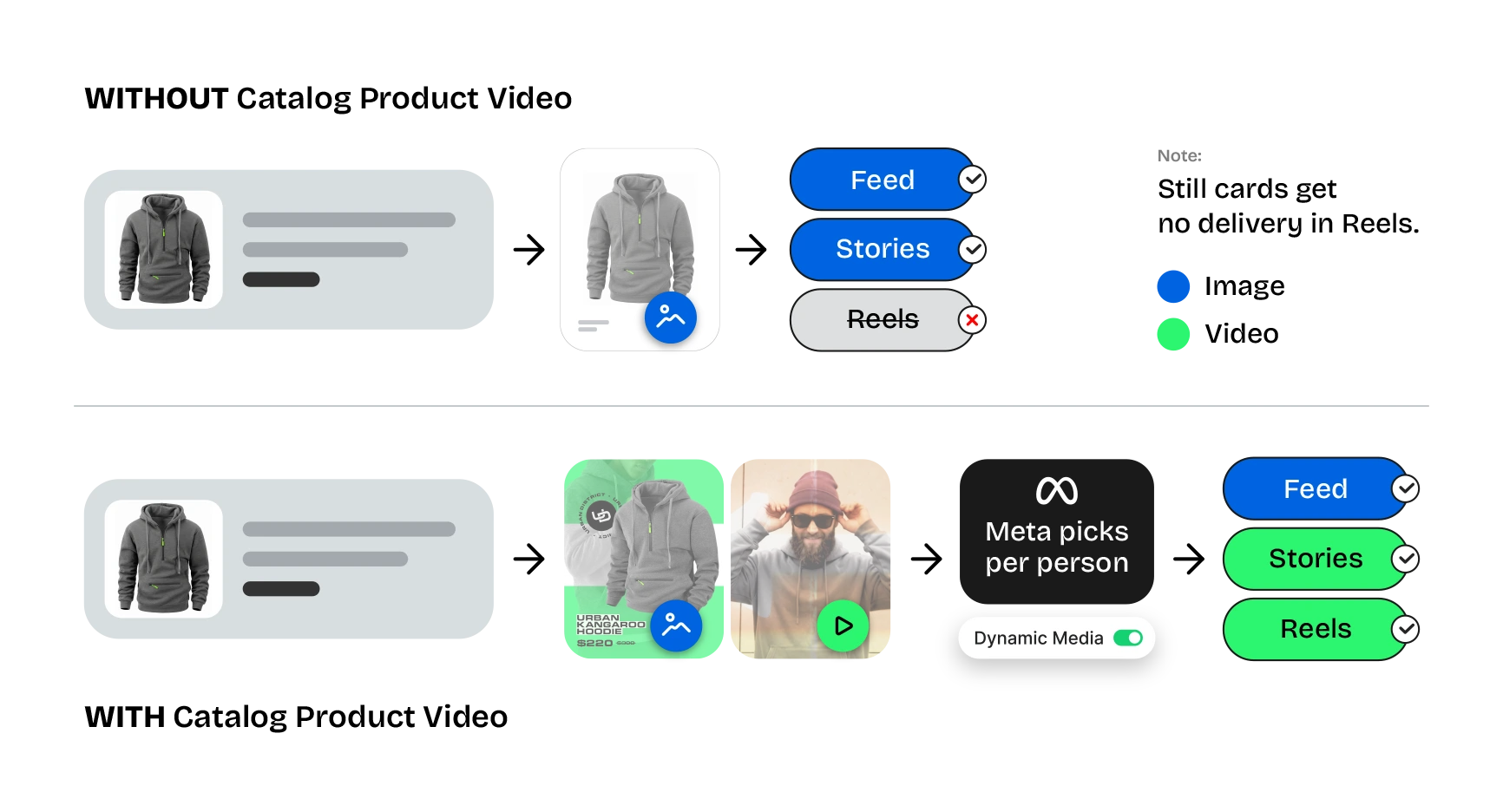
Dynamic Media: the ad-level setting in an Advantage+ catalog campaign that allows this selection. On, Meta can deliver the video where video performs better, mainly Reels and Stories, and the image elsewhere. Off, the videos in the catalog are not used.
Scaling video creative: extend existing investments in video production across Reels, Feed and Stories.
Delivering creative personalization: Advantage+ solutions identify high-value customers and choose between images and videos based on each person’s behavior.
Improving product discovery: use video as an incremental lever to drive discovery, particularly among broad audiences.
A replacement for image catalog ads:Meta recommends adding video alongside images and letting delivery choose.
A slideshow of the feed: each video shows one product.
A standard video ad pointed at a product set: catalog product video is attached to the SKU.
[Chapter 02]
Video accounts for 60% of the time people spend on Facebook and Instagram.
A catalog that cannot show video misses more than half of it.
20%
more conversions per dollar for ad sets with catalog product video, compared with ad sets without it
Source: Meta, 1M+ ad sets
19%
of delivery in Reels for catalogs with product video, compared with none for still catalogs
Source: Meta
85%
higher reach for catalogs with product video, compared with still catalogs
Source: Meta
33%
higher incremental conversions for campaigns with product video delivering in Reels
Source: Meta
Reaching Reels: a still product card gets no delivery in Reels. A video card does.
Giving the auction more options: Advantage+ catalog ads pick the product for each person; Dynamic Media adds the format to that choice. Meta recommends adding video alongside images for that reason.
Keeping the product in focus: the video shows the product the person viewed, with the current price from the feed. Retargeting is where the gains are largest.
Measuring it: video earns fewer clicks and more purchases, so click attribution understates it. read how to.
[Chapter 03]
First tests usually fail before the first impression, on the catalog, the file sizes or the share of products covered. Three checks before launch.
Use the existing catalog: catalog ads learn per catalog, and a new one can take up to two weeks to reach peak efficiency. If a partner builds the videos, confirm it publishes into the existing catalog.
Set the data source to update, not replace: in Commerce Manager, schedule the feed to update changed items. A full replace makes Meta re-process every video on every sync.
| Placement | Format | Ratio |
|---|---|---|
| Reels, Stories | Single media | 9:16 |
| Feed (Fb and Ig) | Single media | 4:5 |
| Feed carousel | Carousel card | 1:1 |
One size only: create 4:5, turn on automatic video cropping, and review a sample. Files: MP4, up to 200 MB, with product, price and logo inside the Reels safe zone.
Coverage decides delivery: Meta shows the video only for products that have one. Video on products that receive 5% of impressions leaves 95% static, and the test measures almost nothing.
Target: 30% to 50% of product impressions from products with video. Start with the products that get the most impressions. Creatives rendered on demand cover every product, which is how catalogs of 50,000 or more are covered.
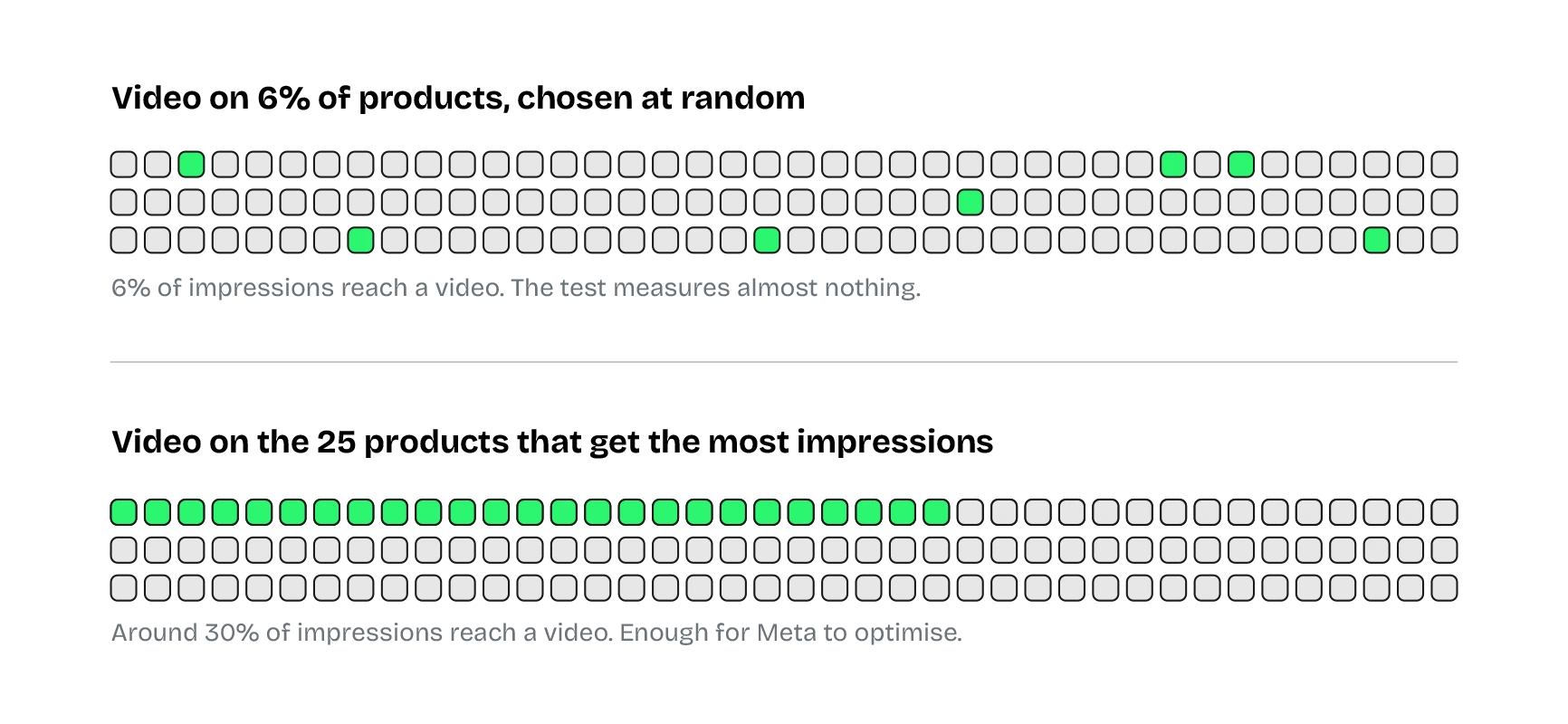
Example: a grocery catalog entered a test with video on 6.4% of items. Meta’s coverage report showed it before the result was read.
[Chapter 04]
A catalog without videos is the normal starting point. The images already in the feed are enough, and Meta’s guidance is to start with top-viewed and top-selling products.
The image moves into frame, price and discount animate in.
Effort low. One product at a time stops working beyond a few hundred products.
Texture, lifestyle or runway footage behind the image, product and data on top.
Effort medium. Keep the product clear of the footage’s key visuals.
A few seconds of a brand ad behind the product or as the outro.
Effort medium. As an intro it delays the product past Meta’s 2-second window.
A person using the product, catalog data overlaid.
Effort high, so usually hero SKUs. A consistent frame keeps it one brand.
Each approach makes one video. One creative connected to the feed renders a video for every product, with that product’s image, name and price, and a change to the creative updates every video.
[Chapter 05]
Meta’s video guidance was written for brand video. Catalog ads reach people who already know the product, which changes what the first two seconds are for.
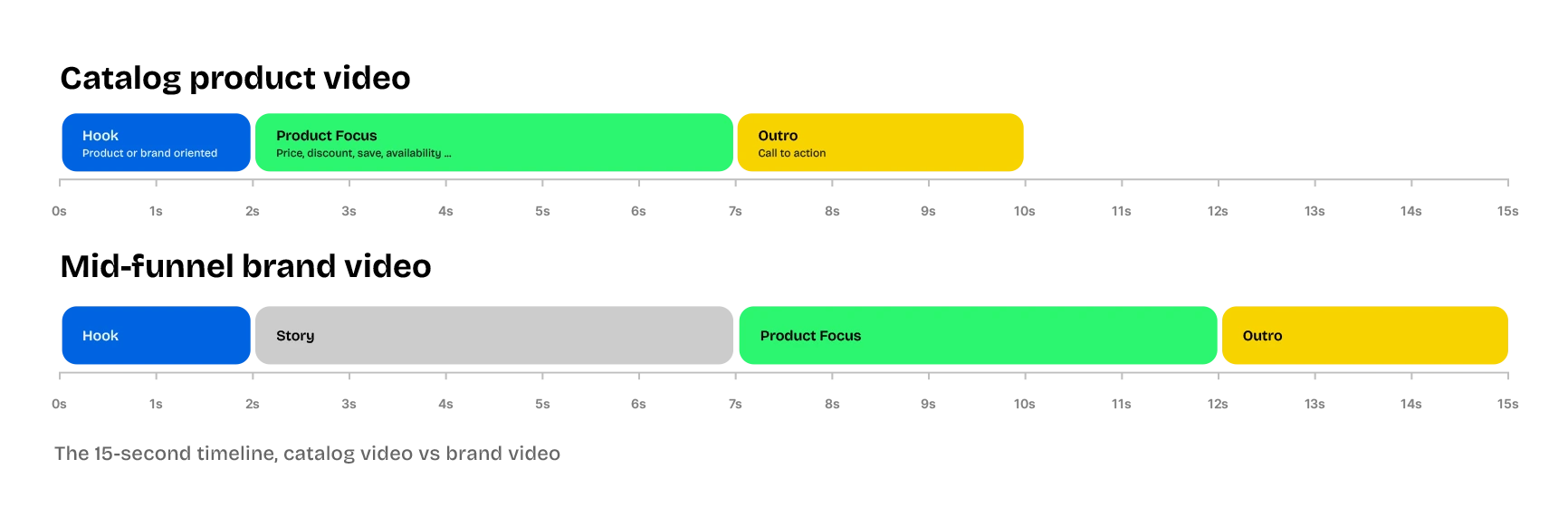
Meta’s hook window is 2 seconds. For someone who viewed the product, the product is the hook, so it belongs in the first frame.
Logo or brand colour beside the product from the first frame; the branded outro with the call to action in the last two seconds.
Call to action by 5 to 6 seconds, under 15 seconds in total. Catalog videos loop and repeat inside a carousel.
The click lands on that product’s page. Several products dilute the signal.
Name, price, sale price, discount, shipping, rating. Other video formats cannot carry live product data.
Readable without sound, then audio from Meta’s Sound Collection or Reels Audio Library.
Short and specific, “See details” rather than “Learn more”.
Around 125 characters, one benefit, no repeat of what is on screen.
Use the full dimensions of each placement.
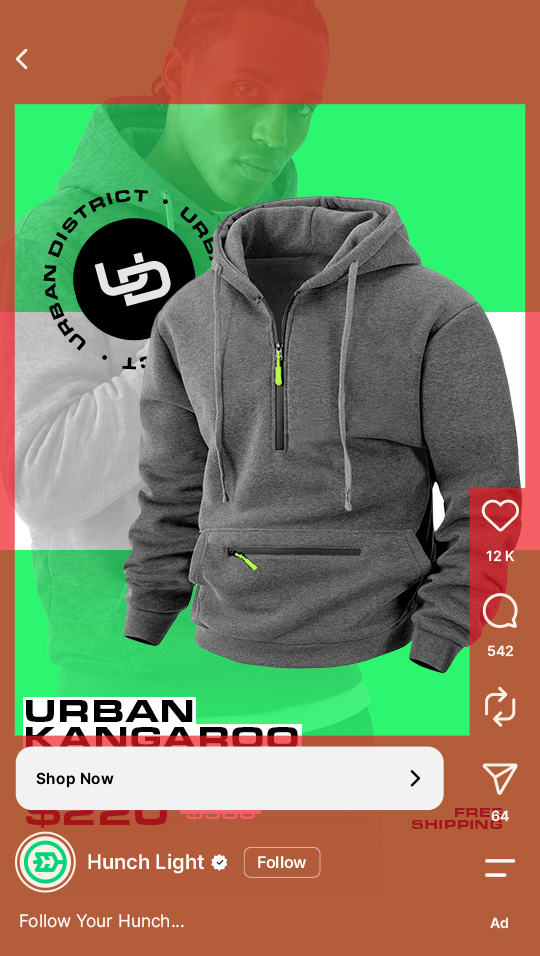
The Reels UI covers the bottom and right edge. A price that reads in 4:5 can sit behind the caption in 9:16.
| Symptom | Likely cause | Change |
|---|---|---|
| Few 3-second views | First frames slow or empty | The opening: product larger, sooner |
| Watched, few purchases | Offer or product unclear | The middle: price, discount, name |
| Clicks, no purchases | Weak CTA or landing page mismatch | The outro and the destination page |
[Chapter 06]
The setup adds to what already runs. In this order, the existing ads keep their learning.
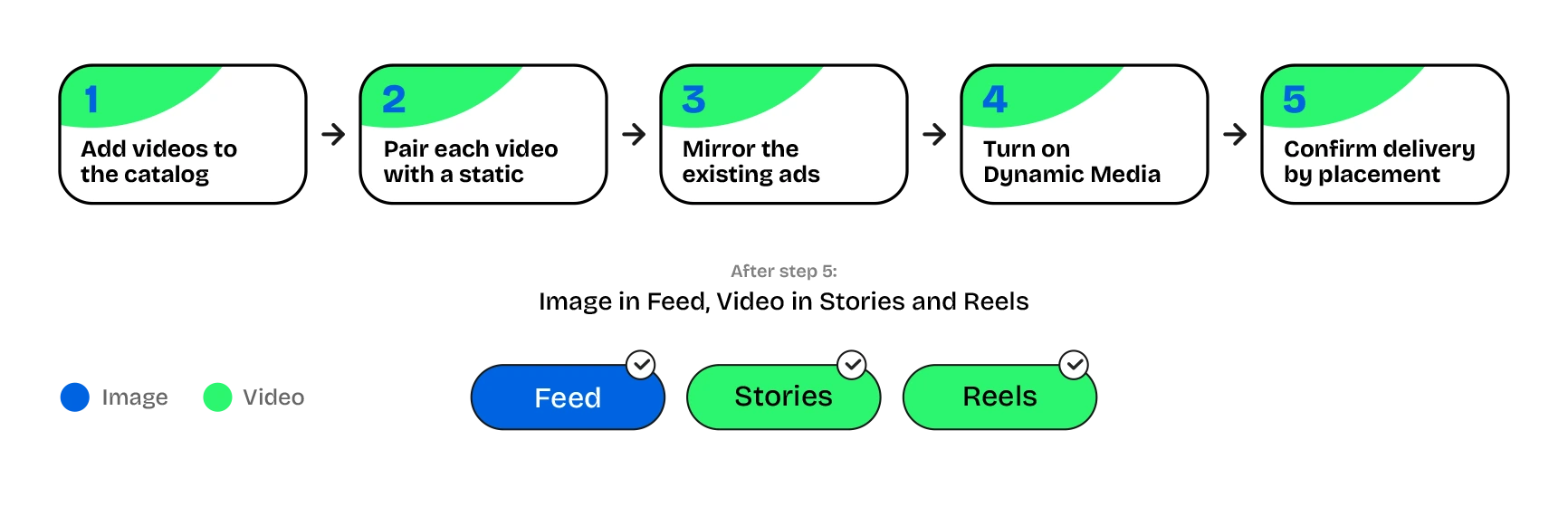
Each product row gets a video URL, like its image URL, with one per size. Upload in Commerce Manager, sync from product data, or let a partner publish into the existing catalog.
A video cannot run alone in a catalog ad. Meta delivers the image in some placements and the video in others, so each product needs both.
Business-as-usual catalog ads are usually a carousel and a single-media ad, both image. Keep them and add the same two ads with the video linked, in the same ad set. Carousel shows video in Stories and Reels only; in Feed a carousel card falls back to the image. Single media shows video in every placement, so it carries the larger share of video delivery. Collection ads also carry catalog product video.
In the ad’s creative section, enable “Dynamic Media” (“Allow product video” in some accounts). Catalog ads created through the API since September 2025 have it on by default, so confirm it in each ad.
Previews show whichever version Meta renders at that moment. Check the breakdown by placement after a few days; Reels delivery appearing is the sign. Meta fetches new videos within a two-hour window and transcodes before delivery, so a video added in the morning may serve the next day.
| Check | What you see | Fix |
|---|---|---|
| Coverage too low | Reels delivery flat | Video on the products with the most impressions, or render for every product |
| Dynamic Media off | Videos in the catalog, none delivered | Enable it at ad level |
| Carousel only | Video in Stories and Reels, never Feed | Add a single-media ad |
| Too soon | Added this morning, none serving | Check the next day |
| Feed replaces itself | Videos keep dropping out | Set the data source to update, not replace |
[Chapter 07]
Catalog product video earns fewer clicks and more purchases. A click-based read can show it losing while a lift study shows it winning, so decide which read to trust before the test starts.
Why clicks understate it: people watch a Reel, do not tap, and buy later from search or a direct visit. Under a 7-day click window that purchase is not credited. A reliable test uses a holdout, or at least a window that includes views, such as 1-day engaged view.
| Check | What runs |
|---|---|
| Control | One campaign, one ad set, one carousel catalog ad with static cards. Dynamic Media off. |
| Treatment | One campaign, one ad set, four ads: carousel static, carousel video, single-media static, single-media video. Dynamic Media on. |
Both campaigns net new, on the existing catalog, same targeting, objective, optimisation, bid and attribution. At least two weeks, budget for around 50 conversions per cell per week, a 10% holdout on each cell through a lift study. Read the treatment cell as a whole: four ads against one is the design.
Without a lift study: two ad sets in one campaign, one with the image ads only and one with the same ads plus video, split evenly, two weeks, 7-day click and 1-day engaged view on both. Watch cost per purchase per ad set, Reels and Stories delivery share, and reach. If Reels delivery did not rise, the video was not serving; back to chapter 3.
Cost per purchase and ROAS at ad-set level, not per ad.
Incremental conversions from the lift study, where one ran.
Reach and Reels delivery share.
Single media versus carousel inside the video ad set, as a secondary diagnostic.
Video on too few products.
Dynamic Media left on in the control.
A change mid-test: a sale, a budget move, a new product set.
[Chapter 08]
No. The video is attached to the product and delivers inside the catalog ad you already run.
Both, in one ad set. Carousel shows video in Stories and Reels only; single media in every placement.
No. Most catalog product videos are animated product images with price and name in motion.
Yes, via a video URL per product, MP4 up to 200 MB, ideally in 9:16, 4:5 and 1:1.
Enough that 30% to 50% of impressions land on products with one, or every product through on-demand rendering.
Per person and placement, by which is likelier to improve the campaign's result. The advertiser's only control is Dynamic Media on or off.
Previews render whichever version serves at that moment. Check delivery by placement instead.
Video is watched, not tapped; purchases come later. Use 1-day engaged view or a lift study and read the ad set as a whole.
Meta is testing generated catalog video in Ads Manager, covering a share of top products with limited brand control. Where brand rules matter or the catalog is large, advertisers use their own creatives.
With product images and one creative, about a day to design; rendering follows as Meta requests videos.
No, and it should not be created. The existing catalog keeps its learning.
[Chapter 09]
Hunch is a Meta Business Partner and has run catalog product video since Meta launched it. Pick the path that fits the catalog.
Self-serve catalog product video. Connect your Meta catalog, build one creative, and every product gets an image and a video. Publish into the campaigns you already run. Free to build, priced by catalog size. Up to 50,000 products and $50,000 a month in catalog spend.
Start Free NowThe full platform, for catalogs above 50,000 products, complex feeds and agencies running several clients. Everything in CPV Accelerator, plus automated campaigns, localized creatives for every location and market, product-level insights, and a dedicated strategist from onboarding on.
Book a Pilot